myERP24 · FeaturesOrganised by workflow
Features at a glance

Every level of your business. One system. Around the clock.

myERP24 is a complete ERP for small and mid-sized businesses: CRM and service, sales and purchasing, accounting, tax, documents, time tracking – in one web app, on every operating system, with AI assistants that learn in the browser.

AI in everyday work

Assistance instead of re-keying.

myERP24's learning models run in the tenant's browser and learn exclusively from their own postings reviewed by people. External AI is connected only via the riebotec AI API – EU data centre, data processing agreement, anonymised data. No suggestion is posted without approval.

Posting AI

Suggests account and tax rate for bank transactions and supplier invoices; pre-filled from 60 % confidence. Trained at the push of a button from approved postings.

Tax assistant

Maps ledger accounts to the key figures of the VAT return, EÜR and BWA – rule-based and learned suggestions side by side. You decide per account.

Document OCR

Reads scans, photos and PDF bank statements in the browser and via an approved EU service; identifies suppliers by VAT ID.

External AI

Additional suggestions via the riebotec AI API. Only key figures and the chart of accounts are transmitted – never postings, amounts or business partners.

01 · CRM & tasks

From customer to task – without a media break.

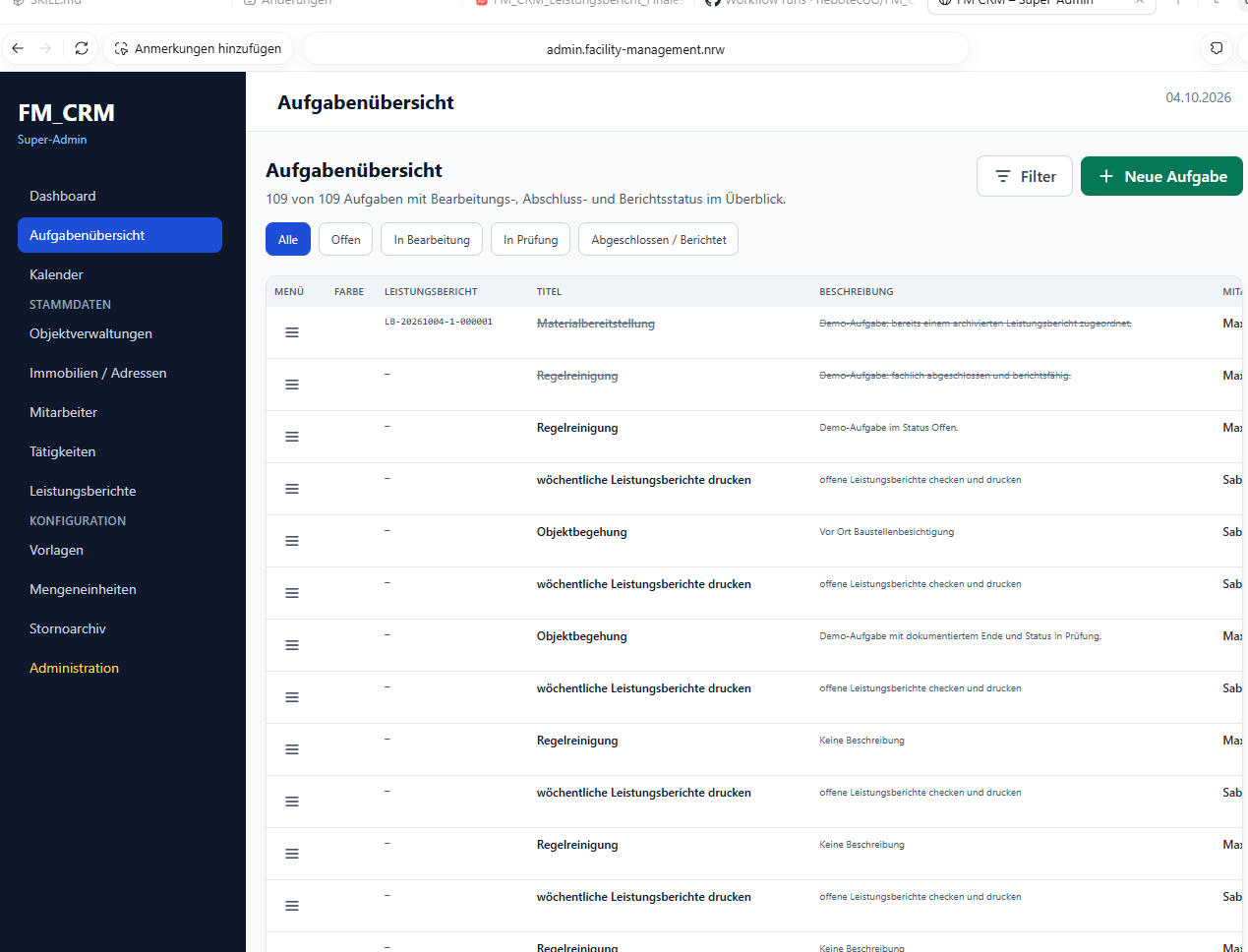
Customer master, sites & addresses, tasks and calendar work on the same data. Every task knows its activity, site, employee, due date and billing status.
  • Customer master with terms, statistics, custom fields, categories and M365 customer folder
  • Customer and ledger account numbers (debtor/creditor) from your own number ranges
  • Sites & addresses with header card, photos, history and map link
  • Tasks with activity, price snapshot, series, checklists and review
  • Calendar with day, working week, week, month – in sync with Microsoft 365
  • Service reports as A4 PDF, archived audit-proof, handed over to order and invoice
From customer to task – without a media break.

Real project view · task overview with status filters
Field service on the same business logic.

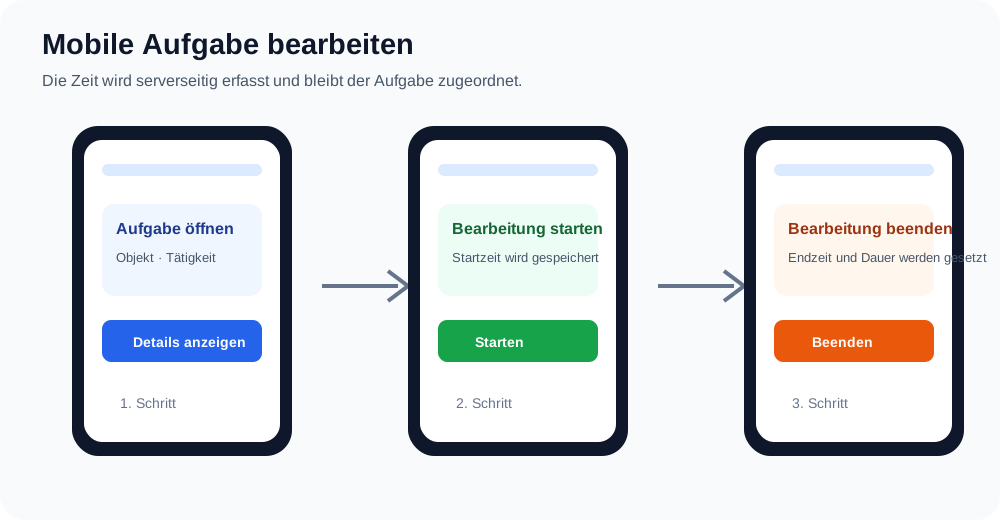
Project graphic · mobile workflow

02 · Mobile

Field service on the same business logic.

On mobile, employees see only their own tasks, start and stop time and work through checklists. Coordinators plan on the go. Roles are enforced server-side.

  • Time tracking with start/stop right on the task
  • Checklists with mandatory items before completion, photos at the site
  • Calendar as list or month, reminders linked to tasks
  • Outlook-style inbox for personal and shared mailboxes (M365, IMAP)
  • Site photo, address and map; light, dark or system appearance
03 · Sales

From quote to e-invoice.

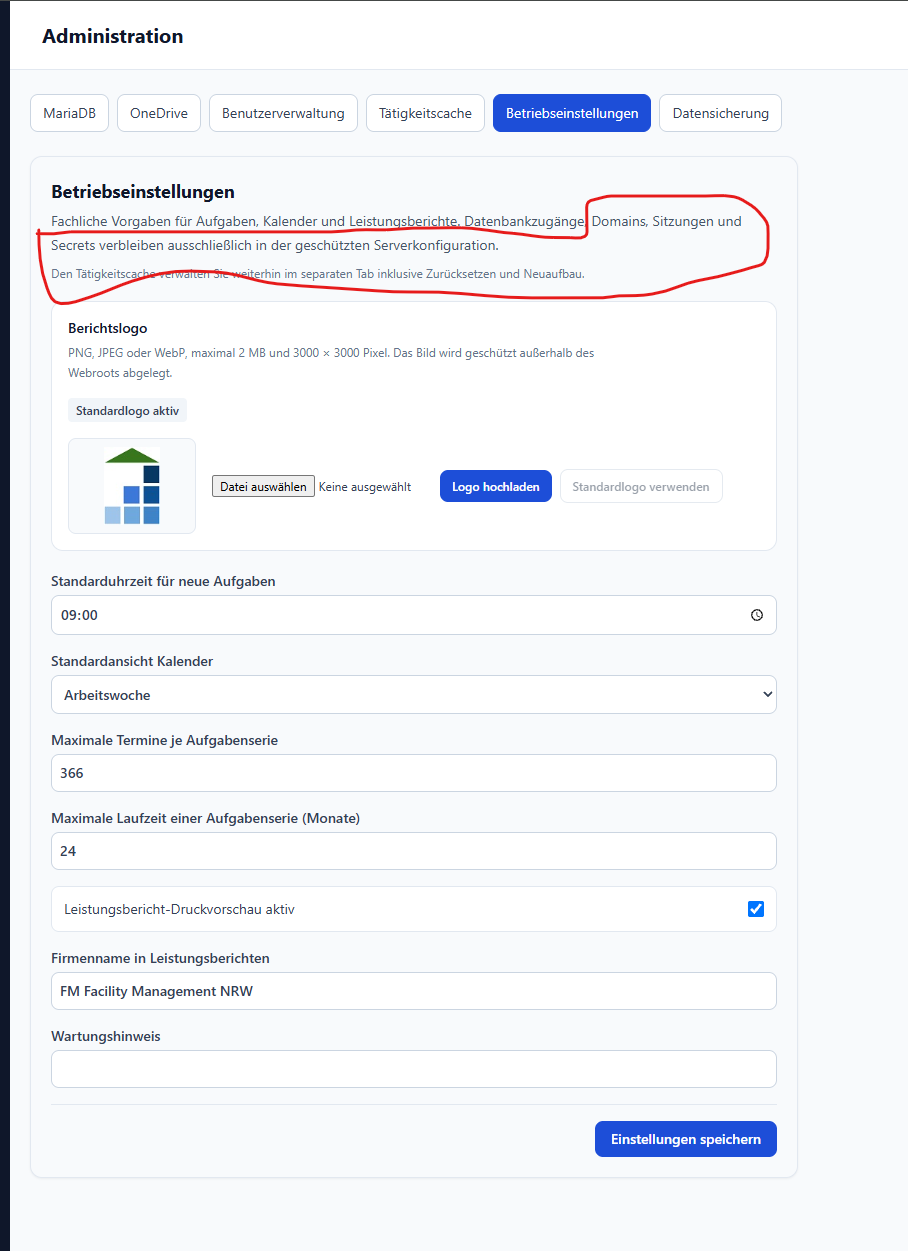
Quotes, orders, delivery notes, invoices and contracts work with drafts, snapshots and their own number ranges. Finalised documents are immutable in line with German GoBD rules.
Follow-on documents

  • Quote → order, delivery note, invoice
  • Partial quantities per document type – deliver and bill independently
  • Down-payment and final invoice (§ 14 (5) German VAT Act) with its own number range
  • Pro-forma invoice, customs / Intrastat with Incoterms

E-invoicing built in

  • ZUGFeRD (PDF/A-3, EN 16931) for business customers
  • XRechnung 3.0 (CII) with routing ID for public-sector clients
  • Format stored per customer, applied on finalisation
  • Reverse charge for EU customers with VAT ID

Contracts & output

  • Separate billing and task intervals, scheduled a year ahead
  • Print view from the form editor in the recipient's document language
  • Audit-proof archive with SHA-256, copy to Microsoft 365
  • Net (business) and gross (consumer) customers
From price request to supplier invoice.

Real project view · document and company settings

04 · Purchasing

From price request to supplier invoice.

The supplier master is built like the customer master. Purchasing documents hand amounts per tax rate to the supplier invoice pre-filled; open items show the discount deadline and a payment recommendation.

  • Supplier master with terms, creditor account, e-invoicing and categories
  • Price request → purchase order → supplier invoice
  • Goods receipt and stock movements per item (inventory package)
  • Payment recommendation: with discount until the deadline, otherwise on the due date
  • Customs data on the item, Intrastat arrivals from EU supplier invoices
05 · Document capture

Parse e-invoices, recognise scans, watch the mailbox.

XRechnung and ZUGFeRD are parsed structurally. Hybrid OCR recognises scans and photos; the e-invoice mailbox creates drafts automatically. Approval stays with you.
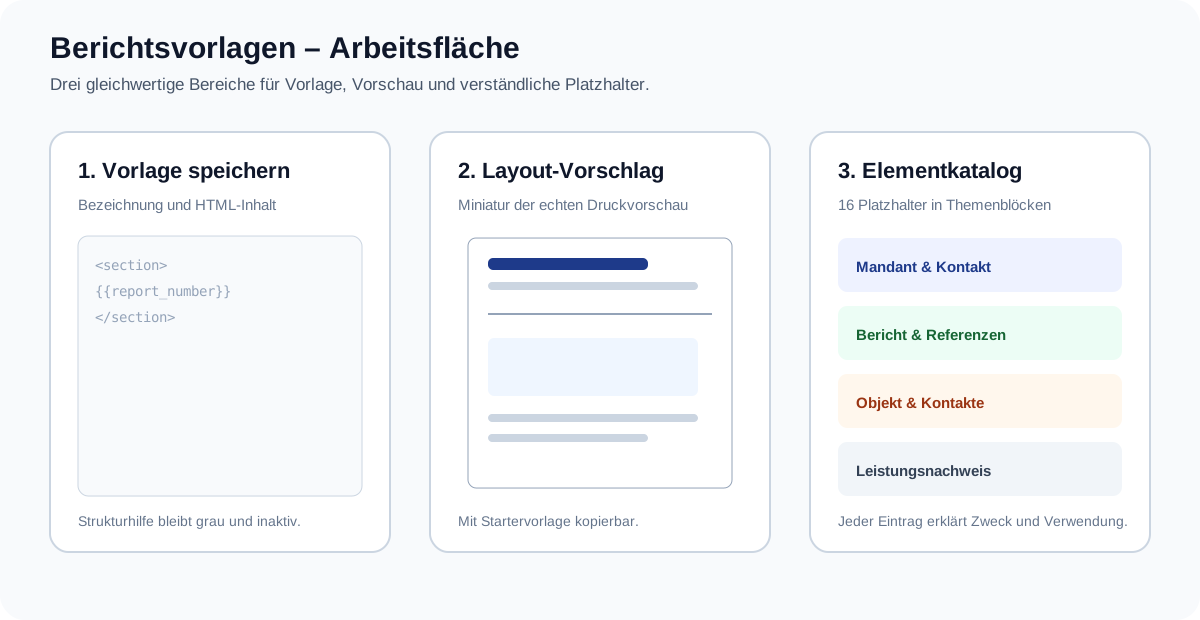
  • Suggestion with supplier, invoice no., due date, net per tax rate, IBAN and routing ID
  • Supplier lookup by VAT ID, name, address – flagged “please check”
  • Duplicate check, original stored immutably, copy to M365
  • PDF bank statements (Sparkasse, Postbank, comdirect and others) with balance check
  • AI memory with approval, rejection and audit per entry
Parse e-invoices, recognise scans, watch the mailbox.

Project graphic · document and template layout

06 · Accounting

Bank, journal, open items, DATEV.

Documents post to the immutable journal automatically on finalisation, approval and payment – using the accounts of your own account determination. Any chart of accounts works.

Bank

  • FinTS (PIN/TAN) with pushTAN approval
  • Import CSV, CAMT.053, MT940, PDF
  • Posting suggestions → approve → post finally
  • Bundesbank bank-code and IBAN validation

Open items & dunning

  • Payment matching with match score, partial payment, discount
  • Four-level dunning run with fee and default interest
  • Post bad debts (§ 17 German VAT Act)
  • Dunning blocks and exceptions per customer

Close & export

  • DATEV export (EXTF): posting batch, accounts, debtors/creditors
  • Accrual or cash-basis VAT per fiscal year
  • Six-step year-end wizard, opening balances
  • GoBD export (Z3) for tax audits
07 · Tax

Tax returns straight from the books.

Every ledger account carries its key figure; the tax assistant suggests it, the forms calculate from it. Today as a PDF worksheet for the German ELSTER portal; direct filing via ERiC follows. Not tax advice – but finished figures for your advisor.

VAT return & annual VAT

Monthly, quarterly, yearly. Key figures from the accounts, prepayment (box 83) recalculated.

EÜR & BWA

Cash-basis P&L (EÜR) and management report (BWA) with calculated lines by catalogue.

E-balance, trade & corporate tax

HGB/XBRL taxonomy with key validation; trade and corporate tax from the BWA with input fields.

EC sales list · OSS · Intrastat

BZSt CSV, qualified VAT-ID check, OSS quarterly return, INSTAT/XML for eSTATISTIK.core.
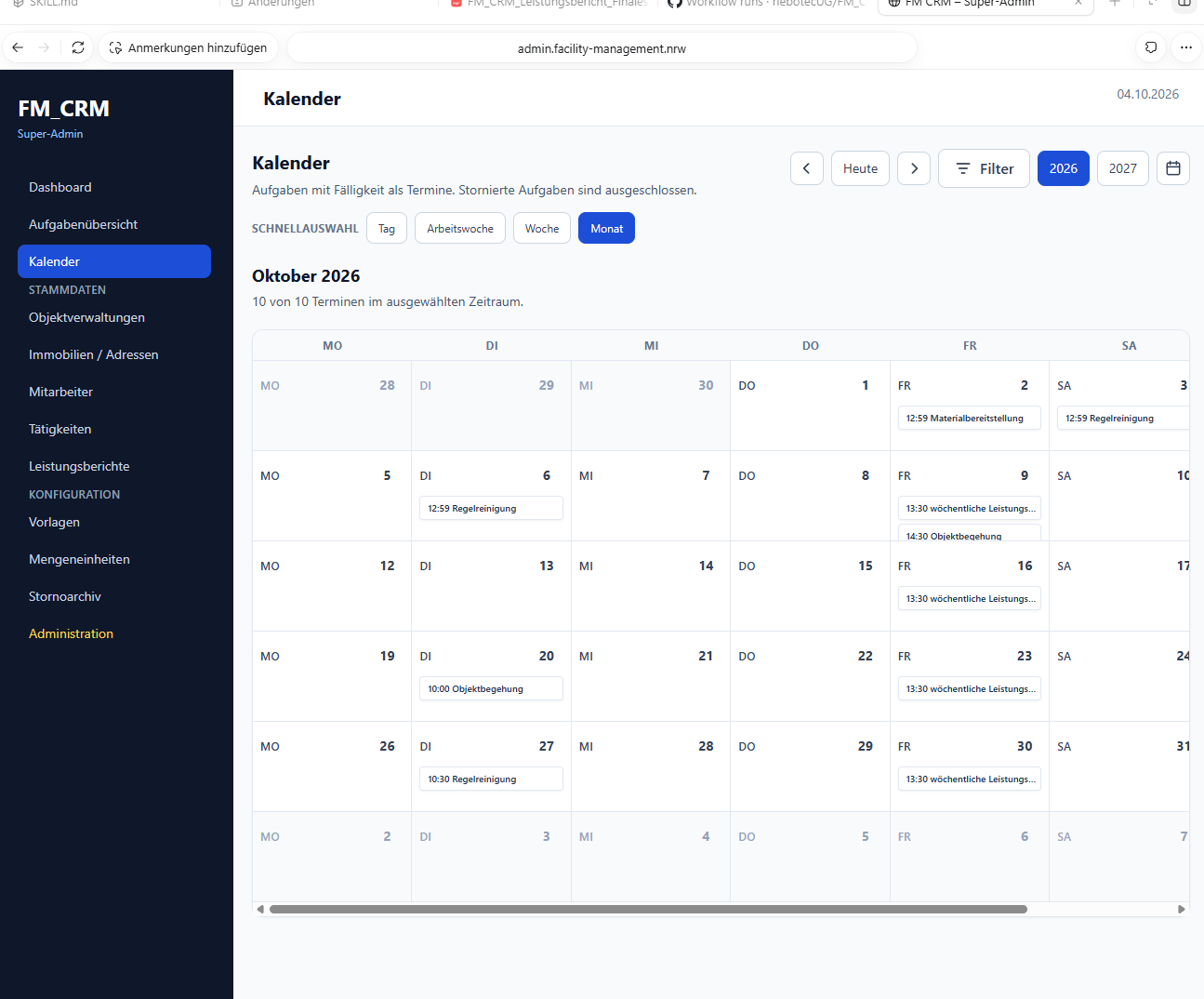
Track time, protect personnel files, manage permissions.

Real project view · calendar with employee colours

08 · Time & HR

Track time, protect personnel files, manage permissions.

Time tracking runs on desktop and mobile directly on the task. Personnel documents are encrypted in the data vault. Permissions are organised into a role matrix, permission profiles and audit.

  • Start/stop on the task, corrections until review, duration per task
  • Employee master with colour, signature, mailboxes and calendar sync
  • Personnel file: contracts, IDs, certificates encrypted with AES-256-GCM, access per user
  • Five roles (user, employee, coordinator, desktop user, administrator) plus permission profiles
  • Maintenance mode, registration and password workflows with administrator approval
09 · Security & retention

Hosted in Germany, evidence for every step.

Data vault

Credentials and files encrypted with AES-256-GCM, key rotation, every view and copy logged.

Retention obligations

Periods under § 147 AO / § 257 HGB (10 · 8 · 6 years), anonymise instead of delete, complete evidence per record.

Audit-proof archive

Every document archived once with SHA-256 outside the web root, copy to Microsoft 365, GoBD process documentation.

Central configuration

Configuration centre with allow-list, secrets never in the browser, signed support-ticket intake with duplicate protection.

Don't just look

Test myERP24 on your own process.

One team, one process, one result: the 30-day pilot starts with a concrete workflow from your business.

Request a pilot ↗